To avoid processing invoices twice (first in FabricAI and then in Hausvise), it is important to set a processing rule at the target level (housing company) in Hausvise that directs invoices directly to the approval cycle from FabricAI. This should be done for each target whose invoices are processed in the FabricAI portal. The rule is created as follows:
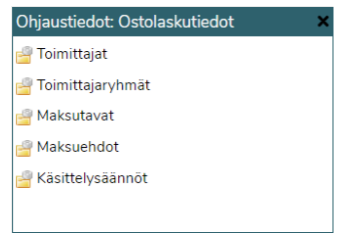
1. Open the processing rules maintenance from the Control Data module.
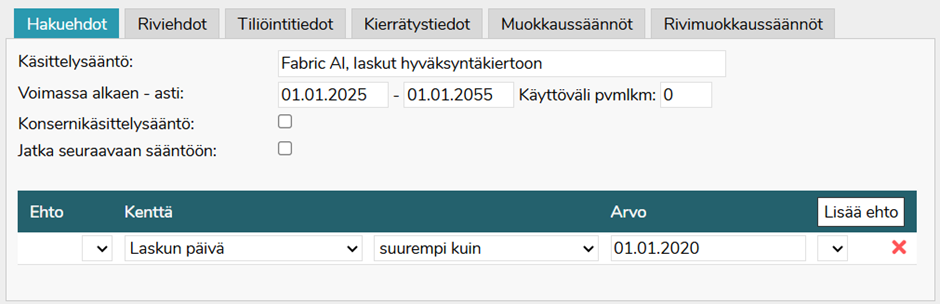
2. Set the condition as shown in the image below:
3. Open the Circulation Data tab and select Approval Procedure > Circulation
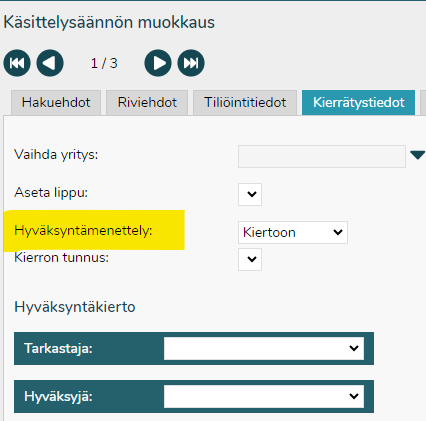
If the approval cycle personnel are not specified in the processing rule, the personnel are retrieved from the company's default cycle.
NOTE! According to FabricAI's information, the default setting in Hausvise is that the account is mandatory before the invoice can be put into circulation. So even when this rule is in effect, the invoice should remain in Hausvise's Incoming folder if
- the invoice is deleted in the FabricAI portal (the invoice is then released with an empty account allocation to Hausvise)
- the invoice arrives in Hausvise in any way other than as an e-invoice (from Kofax or manually) with an empty account allocation
Did you find it helpful? Yes No
Send feedback