Before implementing the FabricAI portal in Hausvise, the following actions must be taken:
1. Opening the connection between FabricAI and Hausvise
Once the contract is signed, Hausvise opens the connection so that all the properties of the hosting office can be transferred to FabricAI. After this, FabricAI trains AI models for the properties. This takes a total of approximately 8 working days. This phase does not require any action from the user, as the process starts immediately after the contract is signed.
2. Remove any account-related settings from Hausvise
To ensure the intended use of FabricAI, it is important that there are no default accounts in the supplier information in Hausvise, and no processing rules at the group, office, accountant, or property level that provide accounts for purchase invoices. You can check these settings in Hausvise under Control Data > Suppliers and Control Data > Processing Rules.
If such rules remain in effect, invoices cannot be reliably processed from the FabricAI portal. If you need help removing these in bulk, you can ask for assistance from Hausvise. This step is recommended to be done the day before the implementation training.
NOTE! If you have processing rules in Hausvise that process the invoice "completely" or "no-look" (directly to the property manager), you can only remove those processing rules that do not do this. In other words, leave those rules in effect that already process invoices completely. In this case, you can only process invoices without processing rules in the FabricAI portal.
3. Add row merging rules to Hausvise and FabricAI if necessary
The use of FabricAI is most efficient if rows are not merged. However, if rows must be merged, you must also define in the FabricAI portal the suppliers whose invoice rows are merged. On the Hausvise side, we recommend leaving the supplier-specific "bypass e-invoice rows" setting on. Separate instructions for this phase here. This step is also recommended to be done the day before the implementation training.
4. Raising properties to the FabricAI portal
Currently, the FabricAI portal can process properties that
- do not need to set cost centers
- do not need to set purchase invoice circulation at the time of invoice arrival (the circulation list is either always the same or varying circulation lists have been automated in Hausvise)
If the property does not meet the mentioned criteria, we recommend leaving the property as the default selection in background automation. However, the majority of properties should be able to be processed in the FabricAI portal.
We recommend raising properties to the FabricAI portal simultaneously with steps 2 and 3, so that invoices can be processed immediately after the implementation training in the FabricAI portal.
Raise properties to the FabricAI portal by following these steps:
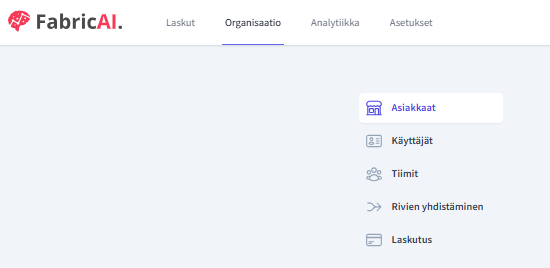
4.1 Go to the Organization tab in the FabricAI portal and select the Clients menu.
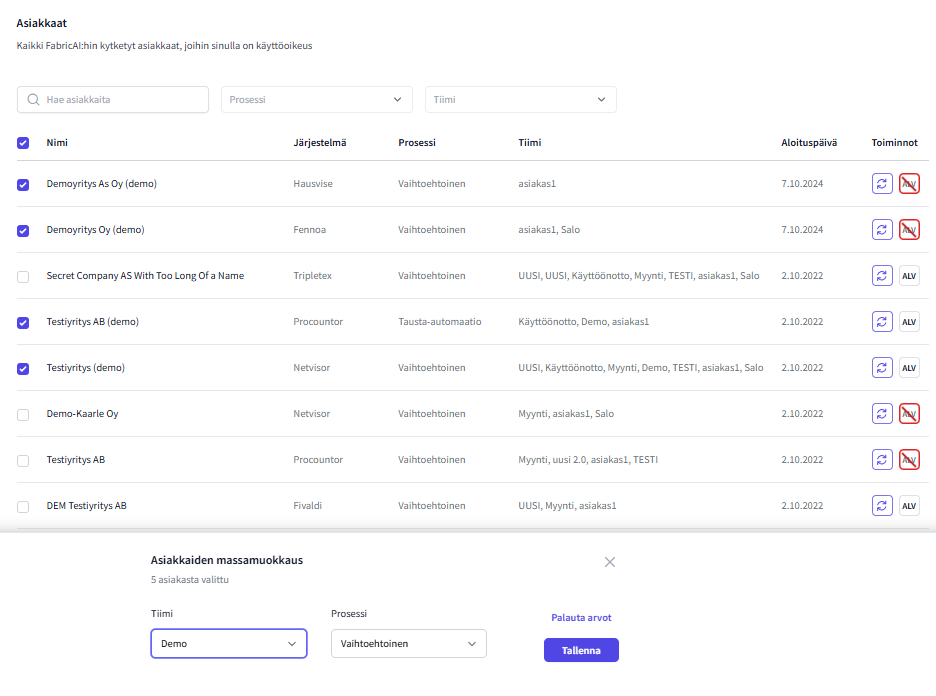
4.2 You can select for mass editing all clients that do not need to be excluded from the FabricAI portal for the aforementioned reasons.
4.3 Add clients to the team and select the "Alternative" process.
5. Participate in the implementation training
The implementation training concerns all FabricAI users, it is generally held remotely and lasts about an hour. The timing of the implementation training is agreed separately with the FabricAI client representative.
6. Create a processing rule in Hausvise for direct invoice transfer to the property manager for those properties processed in the FabricAI portal
NOTE! It is very important that this is done only after the implementation training and the actual start of use. Instructions here.
Did you find it helpful? Yes No
Send feedback