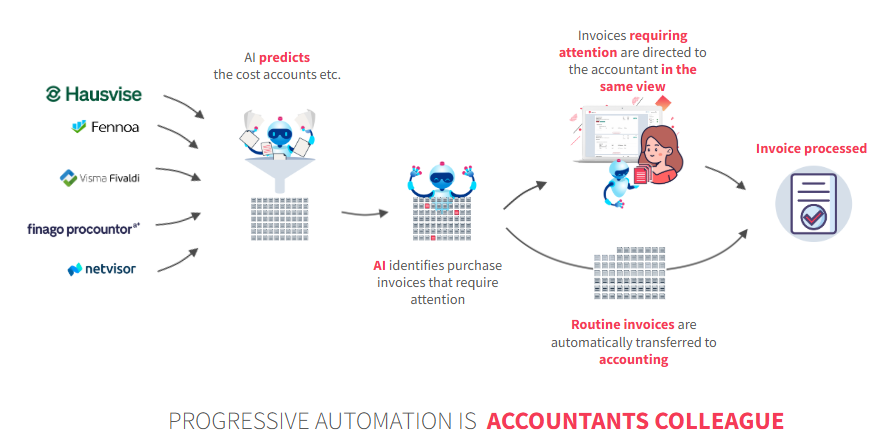
FabricAI's Progressive automation works tirelessly as your colleague in processing purchase invoices. Let the automation handle repetitive, simple invoices so you can focus on monitoring the big picture and resolving more challenging situations.
How does Progressive automation work?
Progressive automation follows your work and identifies essential invoices that should be checked by a human and invoices that you have previously modified. It then directs invoices requiring attention to you in the "Pending" status and processes the rest automatically in the "Completed automatically" status. In practice, Progressive automation processes invoices on your behalf where all the following conditions are met simultaneously:
- the invoice is recurring
- no changes were made to the invoice in FabricAI the previous time
- the invoice total is less than €2000
- AI confidence is at least 80%
How do I enable it?
You can activate Progressive automation yourself in the FabricAI portal by following this guide. To facilitate your work, Progressive automation requires at least a month of active use in the FabricAI portal. During this time, it monitors your work and begins to identify invoices that always recur in the same way and do not require changes. By processing purchase invoices, you are simultaneously teaching Progressive automation to become your personal assistant. We recommend activating Progressive automation approximately 1-2 months after adopting the FabricAI portal. It can also be activated immediately when the FabricAI portal becomes available.
NOTE! From 1.3.2024, Progressive automation will automatically activate for new customers after 8 weeks of use.
How do I ensure the automation works?
Quality control of Progressive automation consists of three parts:
- Random samples of automation
- Analytical review of the balance sheet and income statement
- Confidence limits
Random samples
Approximately 5% – 10% of automatically processed invoices are randomly selected for review by an accountant. Invoices selected by random sampling are displayed in the FabricAI portal among other invoices. This ensures the continuous operation and accuracy of practices.
Analytical review of balance sheet and income statement
With the enhancement of Progressive automation and purchase invoice processing, the aim is to utilize the analytical review of the balance sheet and income statement to gain an overall picture instead of processing individual invoices.
Information from individual suppliers, such as account numbers, can be monitored with spot checks if desired.
If necessary, you can utilize the FabricAI portal's "Completed automatically" status and review how Progressive automation has processed the invoices.
Confidence limits
Automatic processing of invoices requires that similar invoices have been processed previously, no changes have been made to them, and the following conditions are met:
The invoice total is a maximum of €2,000 and AI confidence is at least 80%
The above-mentioned confidence limits can be modified if necessary. An invoice is directed to the accountant for review if the above conditions are not met.
When does Progressive automation not work?
Identified scenarios where Progressive automation may cause more harm than good:
Case 1 – FabricAI is not used correctly
- You perform the accounting processing of purchase invoices in the accounting software instead of FabricAI (customer uses FabricAI)
- You re-account these already processed invoices from the FabricAI portal without any changes
In this case, Progressive automation assumes that everything was already correct and may automate invoices that require some changes. Therefore, it is important for customers using Progressive automation to
- Consistently use the FabricAI portal
- If any invoice/invoices need to be processed from the accounting software, they should be removed from the FabricAI portal
Case 2 – significant process changes
If the purchase invoice process changes so that
- accounting practices are significantly unified/changed
- some process phase is moved from the accounting software to FabricAI (e.g., invoice dimensioning from the customer to the accountant)
- a new phase is added to the process (e.g., dimensioning or setting the invoice posting month monthly)
Progressive automation is not aware of such changes without action. In these cases, we recommend contacting tuki@fabricai.fi, so we can reset the teaching material for Progressive automation. Alternatively, you can simply set Progressive automation inactive and/or utilize prohibited suppliers for Progressive automation.
Case 3 – posting months are not reviewed in FabricAI monthly
If the customer's purchase invoice posting months are not actively reviewed every month for the months the invoices concern, but this should be done in the month following the end of the fiscal year, we recommend reading this guide.
Did you find it helpful? Yes No
Send feedback