If you have made changes to cost centers (calculation objects/dimensions), circulation lists or the chart of accounts on the accounting program side, the information normally updates to FabricAI within a day. However, you can force their update from the FabricAI portal, in which case the information will update within 15 minutes. Note! This function is not available for Hausvise clients.
Where can you find the function?
- Go to the Organization tab in the FabricAI portal.
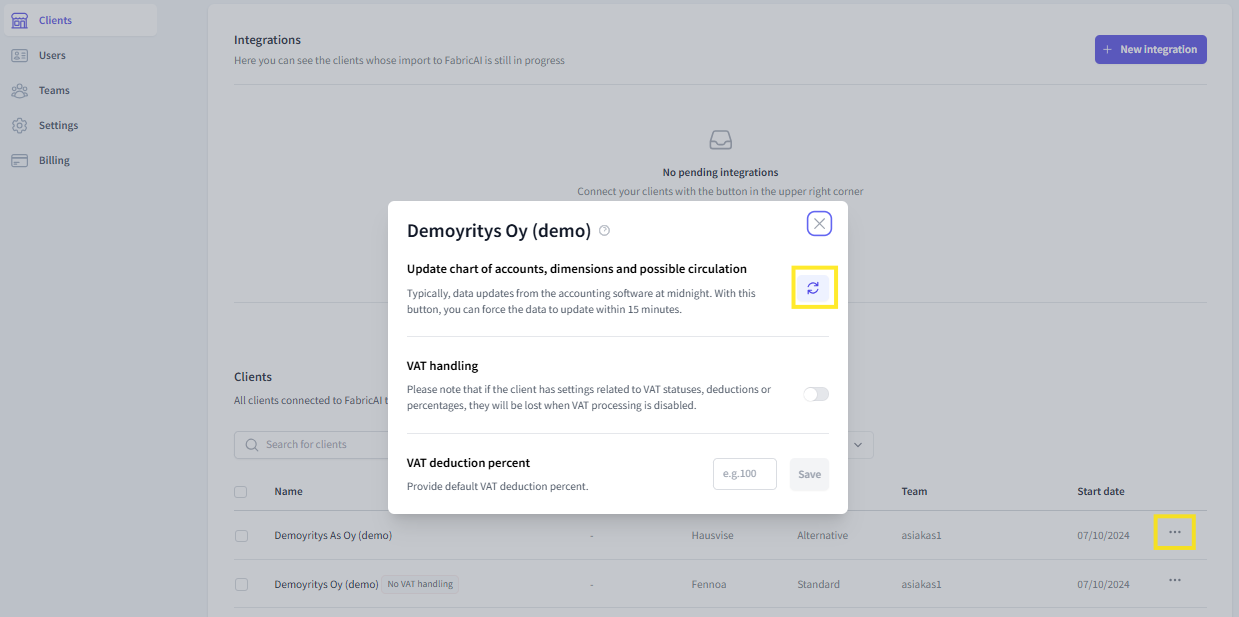
- Below the connections on the right side, search for the desired client using the 'Search for clients' function.
- The three-dot button on the right side of the client listing opens a new window.
- In the new window, click the button at the section “Update chart of accounts, dimensions and possible circulation”. When you click the button, the information will update within 15 minutes.
This article has been translated using an AI-based translation tool. The contents or wording of these instructions may differ from those in other instructions or in the software.
Did you find it helpful? Yes No
Send feedbackSorry we couldn't be helpful. Help us improve this article with your feedback.