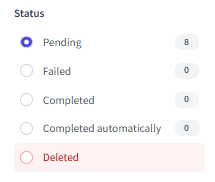
An invoice usually appears in the FabricAI portal when it has been approved by the customer. After this, it can be in four different statuses in the portal:
1. Pending
This status means that the automation has made its prediction for the invoice and it is waiting for human review and necessary changes.
2. Failed
Invoices in the failed status have, for some reason, not been returned to the accounting program. This can be due to, among other things:
- the invoice has some incorrect information
- there is a setting in the accounting program that prevents the invoice from updating
- the invoice has already been fully processed in the accounting program
- the automation has made an error that prevents the invoice from updating
You can view different error codes from this link: Error codes
3. Completed
When an invoice is processed in the FabricAI portal, it moves to the completed status. This means that the information visible on the invoice has been returned to the accounting program and the invoice has been transferred to the ledger. Invoices are visible in this status for about two months, after which the status is cleared.
4. Completed automatically
From this status, you can, if you wish, check the invoices automatically processed by the Self-directed automation. Like invoices in the completed status, invoices in this status have also been returned to the accounting program and transferred to the ledger.
5. Deleted
From this status, you can, if you wish, view invoices that have been deleted from the FabricAI portal. Deleted invoices are shown for 2 months from the moment the invoice arrived as new in the portal.
Did you find it helpful? Yes No
Send feedback