Adding cost centers/dimensions/calculation targets/tracking targets to purchase invoices can be handled automatically either by AI prediction or rule-based methods. However, it is important to understand when automation can be utilized. In both cases, the addition of calculation targets must be based on some logical cause-and-effect relationship that can be inferred from the invoice data.
Read more about the cases where AI predictions succeed best and how calculation targets should be named and appear on invoices to achieve the best results here.
AI predictions
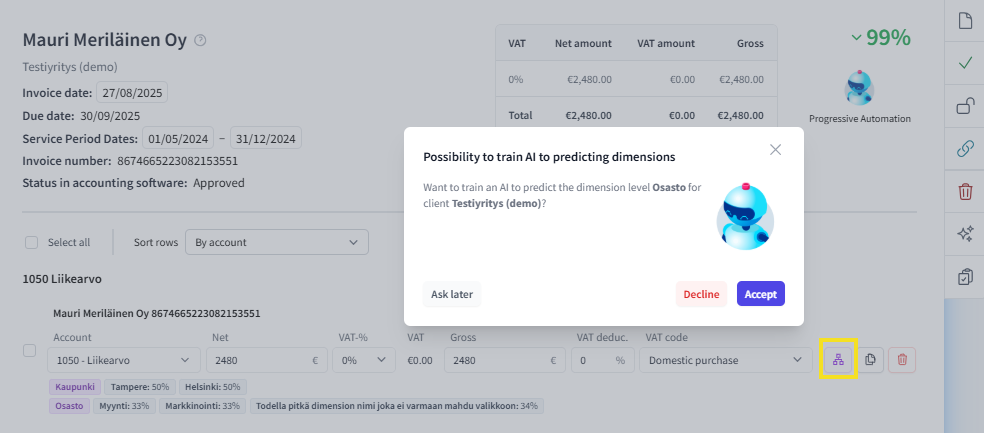
On March 4, 2025, a feature was added to the FabricAI portal where selecting dimensions (button circled in yellow in the image below) can open a window suggesting the training of AI dimension predictions.
The suggestion appears within 24 hours if the client is new and has dimensions in the accounting program.
For old clients, prediction is suggested if more than 10 significant changes have been made to dimensions in the last 14 days.
Predictions can be activated for the proposed dimension level by selecting “Accept”. By selecting “Ask later”, the window will open again in a week.
Guiding AI in dimension predictions
If AI does not succeed in predicting calculation targets, the Help AI function can be utilized in the FabricAI portal by instructing how dimensions should be predicted in each case. Read the basic guide for the Help AI function here and additional instructions related to dimensions here.
Did you find it helpful? Yes No
Send feedback