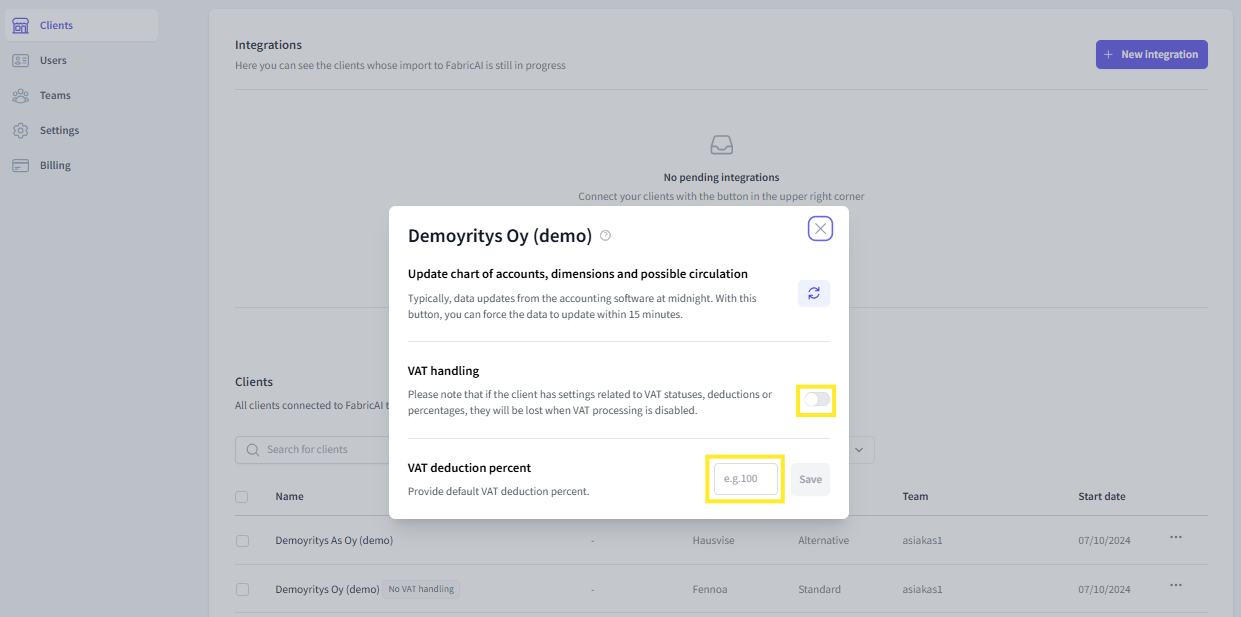
On the Organization tab of the FabricAI portal, you can set a client to be VAT-free, which means that all invoices will automatically have the VAT-% set to 0 and the VAT code 'No VAT handling'. For Fivaldi clients, the no tax handling must also be defined in Fivaldi's tax rate settings for the feature to work correctly (link to the tax rate guide article here).
From the same place, you can also set a partial VAT deduction percent, which is given as default for all invoices.
Where can you find the feature?
- Go to the Organization tab in the FabricAI portal.
- Below the connections on the right side, search for the client you are looking for using the 'Search for clients' function.
- On the right side of the client listing, there is a three-dot button. Clicking the button opens a new window where both settings can be found
- Set the client to be VAT-free by turning the "VAT handling" inactive or set the default VAT deduction percent. Finally, save.
This article has been translated using an AI-based translation tool. The contents or wording of these instructions may differ from those in other instructions or in the software.
Did you find it helpful? Yes No
Send feedbackSorry we couldn't be helpful. Help us improve this article with your feedback.