This guide explains how you can instruct AI in automating dimensions.
You can read more about the Help AI feature here.
- First, select the "Dimension" tab from the Help AI section.
- Select the Dimension level you want to direct.
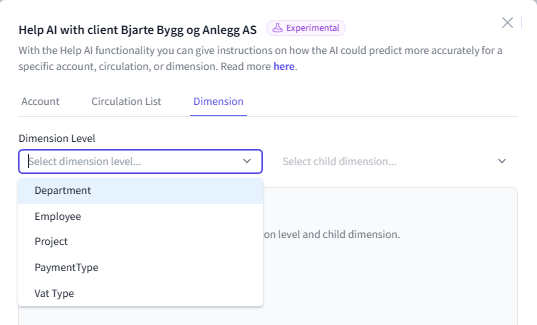
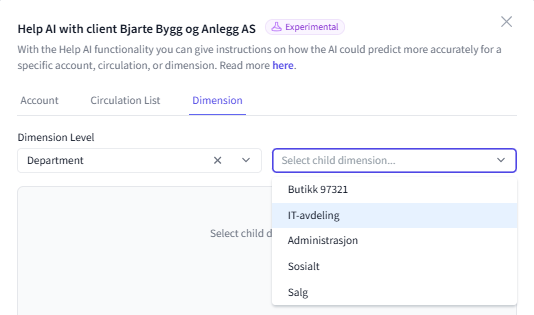
- Then select the sub-dimension.
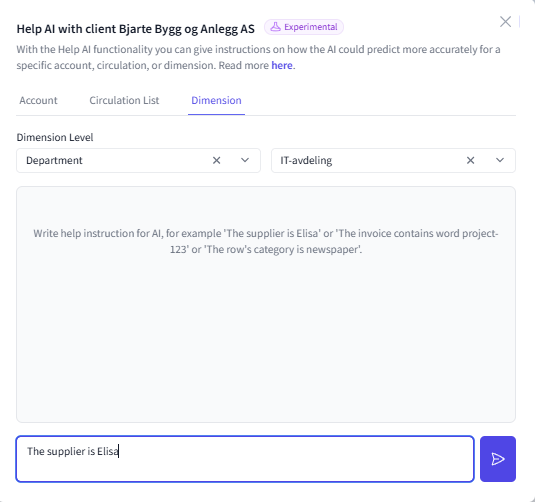
- Then write the help instruction for AI and press send.
- Now the AI will think for a moment and provide you with a response based on its understanding.
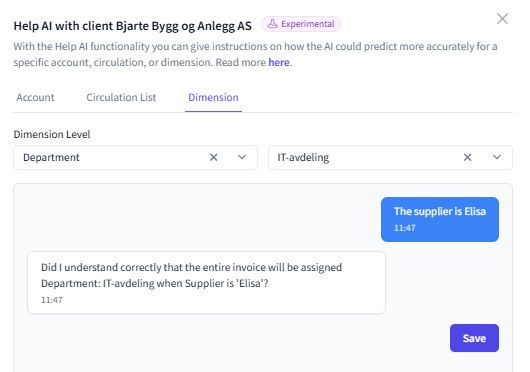
- If you are satisfied with the AI's understanding, press "Save".
If you are not satisfied, you can continue the conversation with the AI until you are happy with the result.
This article has been translated using an AI-based translation tool. The contents or wording of these instructions may differ from those in other instructions or in the software.
Did you find it helpful? Yes No
Send feedbackSorry we couldn't be helpful. Help us improve this article with your feedback.