In March 2024, a functionality called “Accounting assistant” was introduced to the FabricAI portal. The purpose of this functionality is to facilitate the processing and completion of invoices. It is particularly useful in substitution situations and when the client or supplier of the invoice is new to the invoice handler.
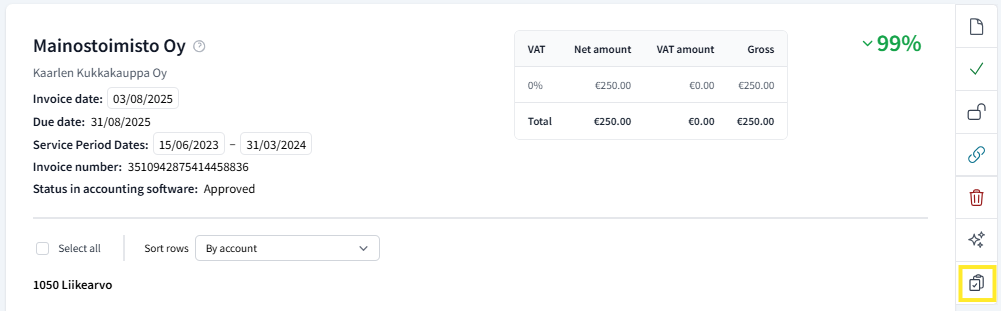
The Accounting assistant can be found in the menu on the right side of each invoice:
What does the Accounting assistant do?
When the function is opened, the user is presented with a view as shown in the image below (example from our test environment):
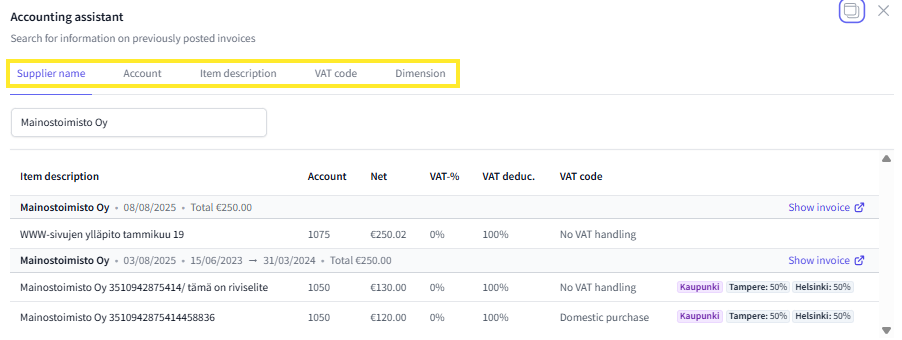
Below are explanations for different search criteria:
- “Supplier name” – first opens the completions of previous invoices from the supplier of the invoice in question (from which the function is opened). It is important to note that this view only concerns completions made through FabricAI. This view shows the accounting accounts selected for previous invoices from the supplier, the VAT handling of invoice lines, totals, and selected calculation targets/dimensions from previous invoices. This helps in determining the completion of the invoice being processed by seeing how previous invoice lines from the supplier have been recorded. From this tab, you can also search for invoices from another supplier by supplier name if needed.
- Next is the “Account” search, which allows you to search for previous completions per accounting account. The search works with both the accounting account number or name. With the search, you see all invoice lines that have been recorded to the specific accounting account.
- Item description search allows you to search based on the item description, how similar item descriptions have been completed previously. With the search, you see all invoice lines where the searched item description has been used.
- VAT code search allows you to search per VAT code, in other words, per VAT identifier. In this search, you see all invoice lines where the searched VAT code has been used.
- Dimension search allows you to search which invoice lines have been previously completed for the dimension according to the search criteria.
What can't the accounting assistant do?
As mentioned earlier, through the accounting assistant, you can only search for completion information of invoices completed in the FabricAI portal.
If you have any questions or feedback about the accounting assistant, please contact our customer support at tuki@fabricai.fi or through the portal's chat function.
Did you find it helpful? Yes No
Send feedback