From 17.4.2025, the handling of VAT items has also become possible from FabricAI to Hausvise. In practice, this means that invoices can also be transferred from FabricAI to Hausvise with
- VAT percent
- VAT code
The actual VAT deduction right is still determined according to the degree of application maintained in Hausvise.
NOTE! In FabricAI, you do not need to maintain information about which item is subject to VAT and which item is VAT-free. The handling between these differs only in that with VAT items, you need to ensure that the VAT percent and VAT code are correct on the invoices in the FabricAI portal. You do not need to touch FabricAI's VAT deduction percent.
How does each combination of VAT percent and VAT code sent from FabricAI convert to Hausvise? See the table below (unfortunately for now in Finnish only):
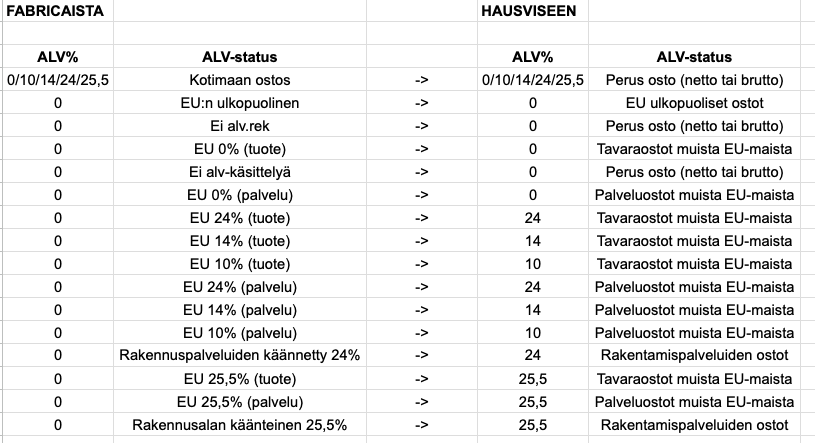
All other combinations of VAT% and VAT code in FabricAI will lead the invoice to Failed status. NOTE! If you would like to use the VAT code Own use on the invoice, this is not currently possible, and we recommend removing the invoice from FabricAI and handling it in Hausvise.
How to get started?
If you started using FabricAI before 17.4.2025, we recommend navigating to the "Organization" tab in the FabricAI portal, where you can change the VAT item process that was in the background to "Alternative", allowing invoices to be processed through the FabricAI portal. Remember to perform other necessary actions for the respective customer from section 2 onwards in this guide.
Did you find it helpful? Yes No
Send feedback