Grant partner user rights (Kumppanikäyttäjäoikeudet)
- Open “Service management”(Palvelunhallinta) in Fivaldi
- Open “Partner users”
- Select “FabricAI”
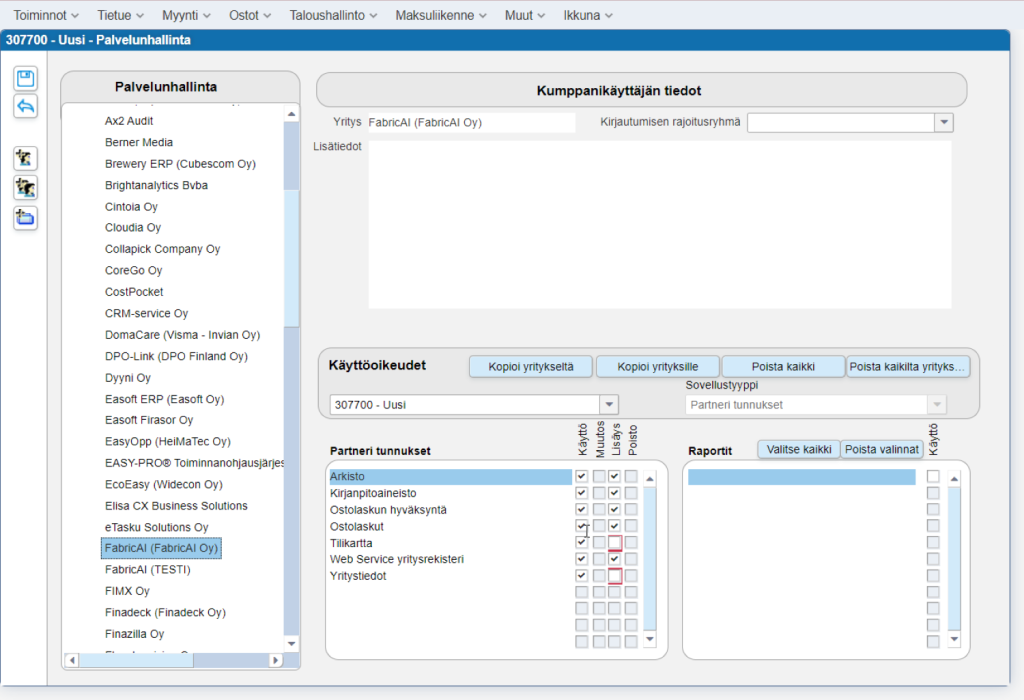
- Grant rights to selected customers as follows (this window only available in Finnish in Fivaldi)
- “Archive” – Use and add
- “Accounting material” – Use and add
- “Purchase invoice acceptance” – Use and add
- “Purchase invoices” – Use and add
- “Chart of accounts” – Use
- “Web Service company register” – (Use & Add)
- “Company information” – Use
Notify companies to be connected to FabricAI via the form
Form for submitting customer information: Go to the form here.
It is your responsibility to add the customer to the correct FabricAI team. Note! Connecting a new customer to the FabricAI portal may take 3-5 business days from the moment partner user rights are granted in Fivaldi.
This article has been translated using an AI-based translation tool. The contents or wording of these instructions may differ from those in other instructions or in the software.
Did you find it helpful? Yes No
Send feedbackSorry we couldn't be helpful. Help us improve this article with your feedback.