If you want to send invoices for circulation in Netvisor via FabricAI, i.e., utilize the "Alternative with circulation" process (read more about processes here), the actions mentioned in this guide must be completed first. You can select the "Alternative with circulation" process when connecting a new Netvisor client in the FabricAI portal, or if the client is already connected with another process, change the process according to this guide.
1. Ensure sufficient rights for the interface ID and resources
This step is unnecessary if the client was connected to FabricAI after August 16, 2023. If your client was added to FabricAI before this, you must ensure that
- The user who created the FabricAI interface ID has the right to set the purchase invoice approval circulation
- Check and edit if necessary by selecting "Sales and purchase ledger rights" from the company menu
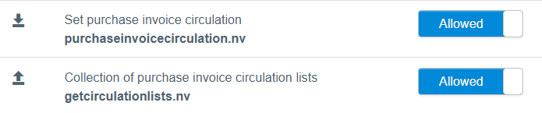
- The interface resources shown in the image below are allowed for the FabricAI integration
- Edit by pressing "Interface resource rights" -> "Custom integration permissions" from the company menu
2. Ensure invoices first go to the FabricAI user in Netvisor
To ensure the process works optimally, it must be ensured that the accountant/ledger manager using FabricAI can access the invoices first (before others) in Netvisor. The situation may often already be in order if the same person has previously directed invoices to the correct circulation lists in Netvisor.
3. Creating or editing circulation lists (if necessary)
From the FabricAI portal, it is not possible to select or automate directing an invoice to an individual person/people, but to the circulation list(s) established in Netvisor. Therefore, it is important to create such lists and name them as clearly as possible. The name should ideally indicate any possible connection to a specific cost center. NOTE! It is not recommended for the accountant/ledger manager using FabricAI to be included in these lists, as it would require actions from them in Netvisor. Additionally, you can of course create a circulation list with only one person.
Note! If there is only one circulation list in Netvisor, invoices automatically go into that circulation.
Ensure circulation lists are in order as follows:
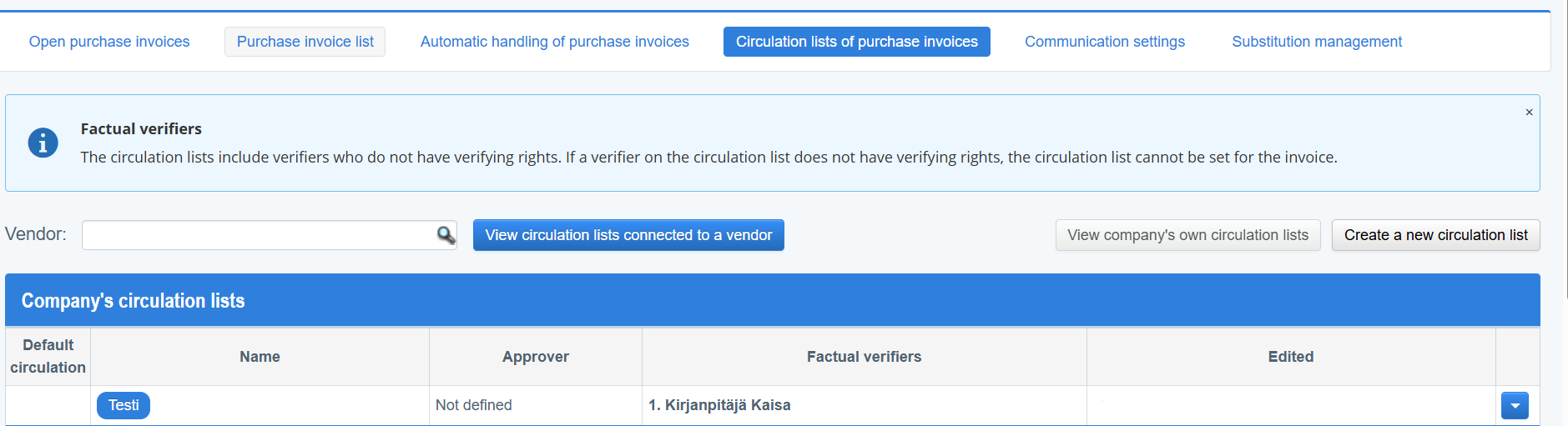
- Open "Purchases" and "Circulation lists of purchase invoices" in Netvisor
- Create the necessary circulation lists for all possible circulation combinations
4. Remove possible circulation automations from Netvisor
We recommend removing any automations from Netvisor that set circulations for invoices. The FabricAI "Alternative with circulation" process is intended to work so that circulation is set automatically or manually in the FabricAI portal. When there are no overlapping circulations in Netvisor, it ensures that invoices are not set for circulation in FabricAI that may have already received circulation on the Netvisor side.
5. Use the "Help AI" feature for automatic circulation determination
If you want the recognition of circulation lists to be automatic and FabricAI to provide these ready for purchase invoices, utilize the "Help AI" feature in the FabricAI portal. Read more about the feature here.
Note! If there is only one circulation list in Netvisor, invoices automatically go into that circulation - no separate settings are needed for this.
Did you find it helpful? Yes No
Send feedback