In Fennoa, there is a default supplier-specific setting where invoice rows are combined.
For optimal AI performance, it is best to display all invoice line descriptions, and therefore we do not recommend using row merging except in exceptional cases.
You can remove the Fennoa setting as follows:
- Select Purchases -> Suppliers and open the supplier in the supplier list where the setting is active. Then select 'Edit'.
- As shown in the image below, select 'Prebook einvoices' -> 'All invoice rows'. Finally, save.
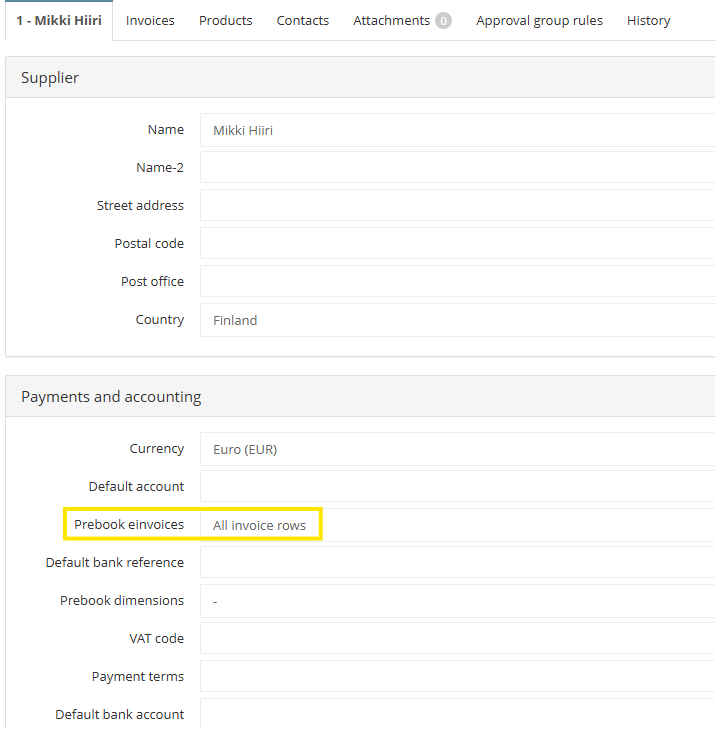
NOTE! A supplier-specific default account set in Fennoa can also cause row merging, meaning that in situations where there is a need to separate lines but invoices are processed with lines bundled, it is advisable to check if a default account has been assigned.
This article has been translated using an AI-based translation tool. The contents or wording of these instructions may differ from those in other instructions or in the software.
Did you find it helpful? Yes No
Send feedbackSorry we couldn't be helpful. Help us improve this article with your feedback.