In the FabricAI portal, you can add a calculation target / cost center / dimension to the invoice manually in three different ways.
1. From the invoice line
Click "Add dimension" below the accounting account selection on the right line. Then select the desired dimension level.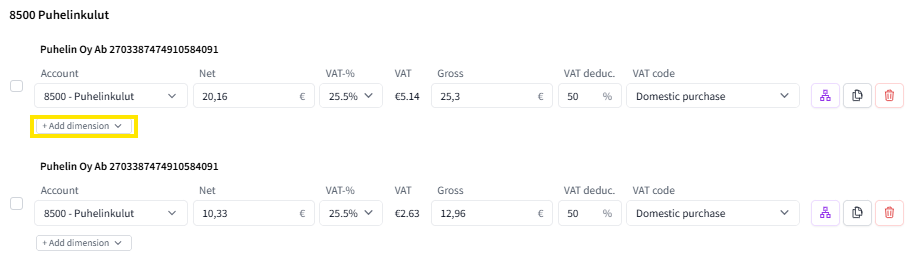 You can change the dimension to the correct one by clicking the arrow next to it and selecting the correct dimension from the dropdown menu.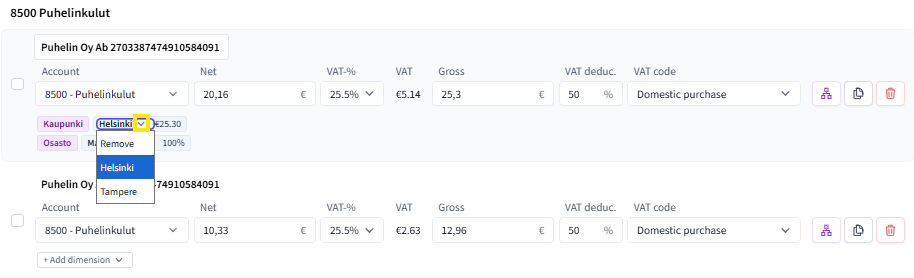
2. By clicking the dimension selection button on the right side of the expense line
 The button opens a dimension selection window, where it is also possible to divide the invoice total into parts for different dimensions, for example, as percentage shares. Read more about allocations in FabricAI here.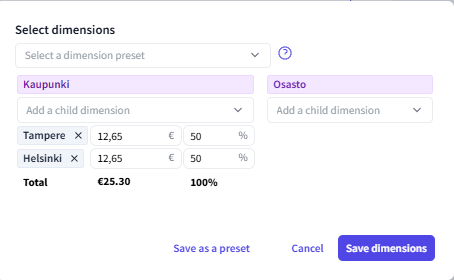
3. Through the mass editor
You can also add calculation targets in bulk by selecting multiple lines and clicking the same dimension selection button from the mass editor that opens at the bottom of the page.
Did you find it helpful? Yes No
Send feedback