Considering the implementation of FabricAI, perhaps the most important aspect is to decide which process will be used to handle invoices. Primarily, it is about when the invoice appears in the FabricAI portal for the accountant or accounts payable expert to process. However, it is also important to consider what each person does in the process and in what order. This article reviews the process options in the FabricAI portal for handling invoices. The article is written with the initial idea that client = purchase invoice reviewer/approver and accountant = purchase invoice accounting handler.
At FabricAI, we would like to support all these processes in every accounting program, but unfortunately, it is not yet possible, as the software interfaces of accounting programs do not all optimally support the requirements of certain processes.
1. Standard process (Fennoa, Fivaldi, Procountor, Netvisor)
The standard process is the most popular and straightforward way to handle purchase invoices in FabricAI, and based on our experience, it suits the vast majority of accounting firm clients. In practice, invoices are processed into accounting from the FabricAI portal after client approval.
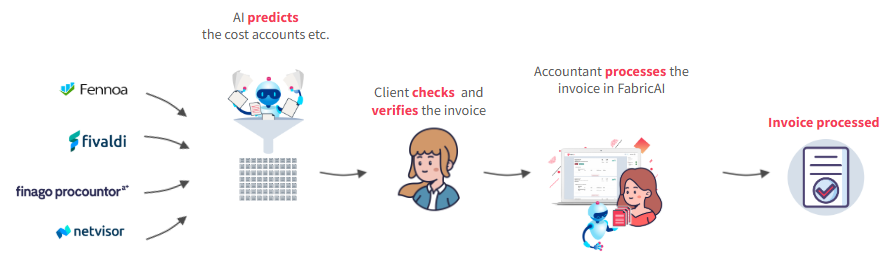
The standard process is particularly suitable for situations where
- The client's and accountant's role is partially divided: the client does part and the accountant does part (the client provides, for example, comments/additional information on invoices or submits/dimensions part of the invoices)
- Invoices always circulate through one recycling group (the purchase invoice accounting handler does not need to direct invoices to different recycling groups)
- The phases and responsibilities of the purchase invoice process are clarified and duplicate work is avoided
2. Alternative process (Procountor, Netvisor)
The alternative process currently works only in Procountor and Netvisor. In the alternative process, invoices can be processed from the FabricAI portal into accounting practically at any stage, as the operation of the alternative process does not depend in any way on the circulation of invoices. The alternative process assumes that the client does not submit invoices at all, but the accountant is responsible for submissions. Therefore, even if the client changes submissions in the accounting program, this does not update to the FabricAI portal. Other changes, such as invoice comments and dimensions, are indeed raised to the FabricAI portal.
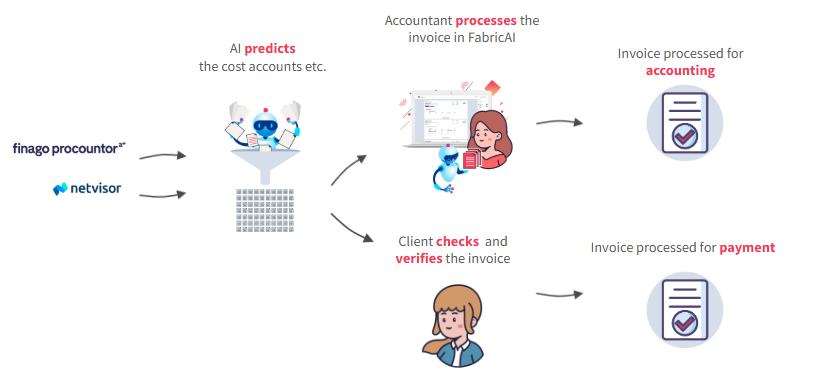
The alternative process is particularly suitable for situations where
- The client does not comment on submissions or add comments, but the client can dimension invoices purely themselves
- Invoices always circulate through one recycling group or the circulation is already automated in the accounting program itself practically one hundred percent (= the purchase invoice accounting handler does not need to direct invoices to different recycling groups)
- The client does not actively accept invoices or an approver cannot be assigned to invoices – invoices are desired to be processed before approval
3. Alternative process with circulation (Procountor, Netvisor)
The alternative process with circulation is currently possible with Procountor and Netvisor. The process works so that invoices are sent from FabricAI to circulation lists (or list) or in Procountor's language reviewer lists. To utilize the process, it must be ensured that the actions in this guide have been done for the Procountor client and the actions in this guide correspondingly for the Netvisor client.
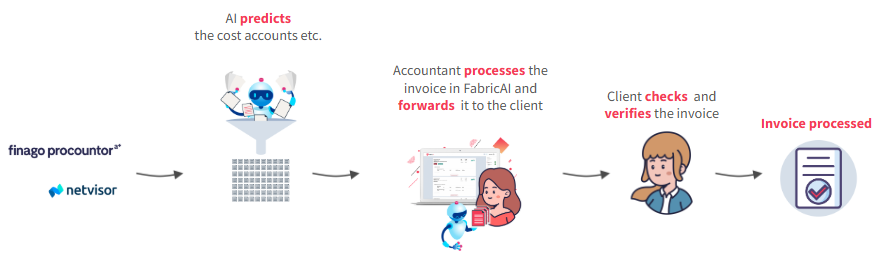
The alternative process with circulation is particularly suitable for situations where
- The client has several different recycling groups, which have not been able to be automated more than at most partially
- It has been agreed with the client that the invoice must have an accountant-checked submission before review and/or approval
- The accountant's task is to send invoices into circulation – in this case, the invoice can be directed from FabricAI to the correct circulation
Note! If invoices cannot be processed in the FabricAI portal for some reason, it is also possible to utilize background process.
Did you find it helpful? Yes No
Send feedback