The purpose of the FabricAI portal is to facilitate and speed up the mass processing of invoices. We also want to assist particularly in substitution situations, which is why we utilize so-called team thinking, where all end clients and users are added to teams, so that all clients can be easily handled in the same view and you can also access other client accounts in your team.
When you start processing purchase invoices in the FabricAI portal, we recommend first selecting your favorite companies. You can choose your favorites according to the situation.
Select your favorite clients as follows:
- Log in to the FabricAI portal.
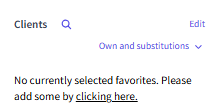
- On the homepage, select "Clients" from the bar on the right and click "Edit" (or "click here")
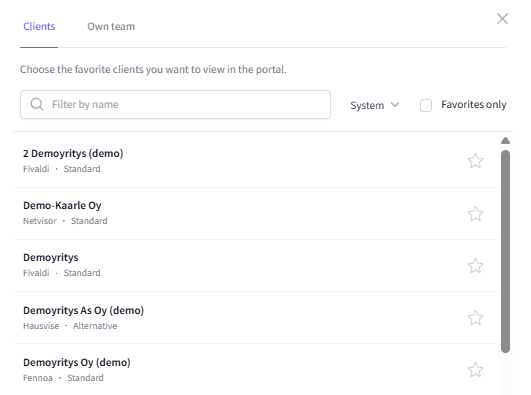
- A new menu will open for you. The menu shows the clients in your team.
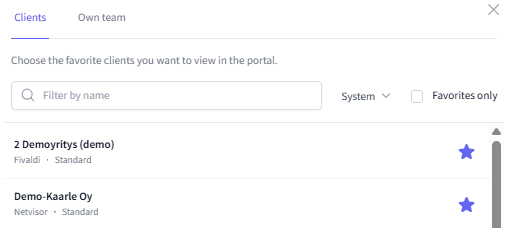
- Press the star next to the client to add it to your favorites on the homepage.
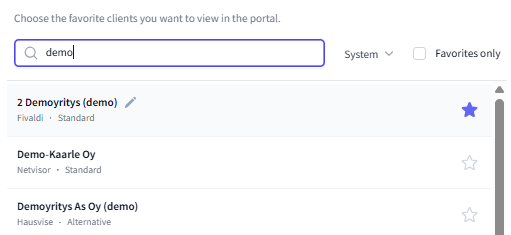
- If your team has multiple clients, you can also filter clients by name:
- You can also filter search results and client companies according to the accounting program.
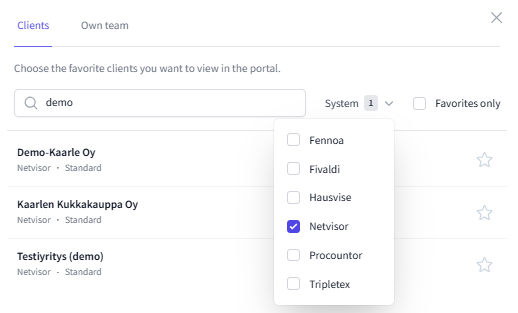
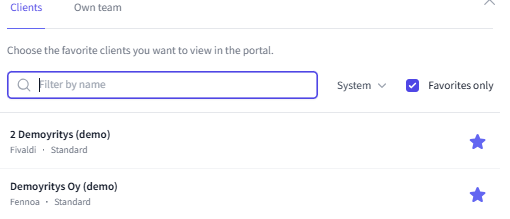
- If you want to remove a client from favorites, press the star again so that it turns back to white. This way, the client will also be removed from the bar on the homepage.
- When you have multiple clients and want to remove them, we recommend checking the "Favorites only" option from the menu. Then only the clients you have selected as favorites will appear in the menu (and not other clients in your team), making it easier for you to remove them.
If you need further assistance with the matter, please feel free to contact our customer support at tuki@fabricai.fi or through the portal's chat function.
Did you find it helpful? Yes No
Send feedback